Case Study — Billing Automation
Automated Payment
Link Generation
A zero-touch billing pipeline: a team member fills a Google Form, and within seconds the client receives a personalised, expiring Stripe payment link by email — with status written back to Google Sheets to prevent duplicate charges.
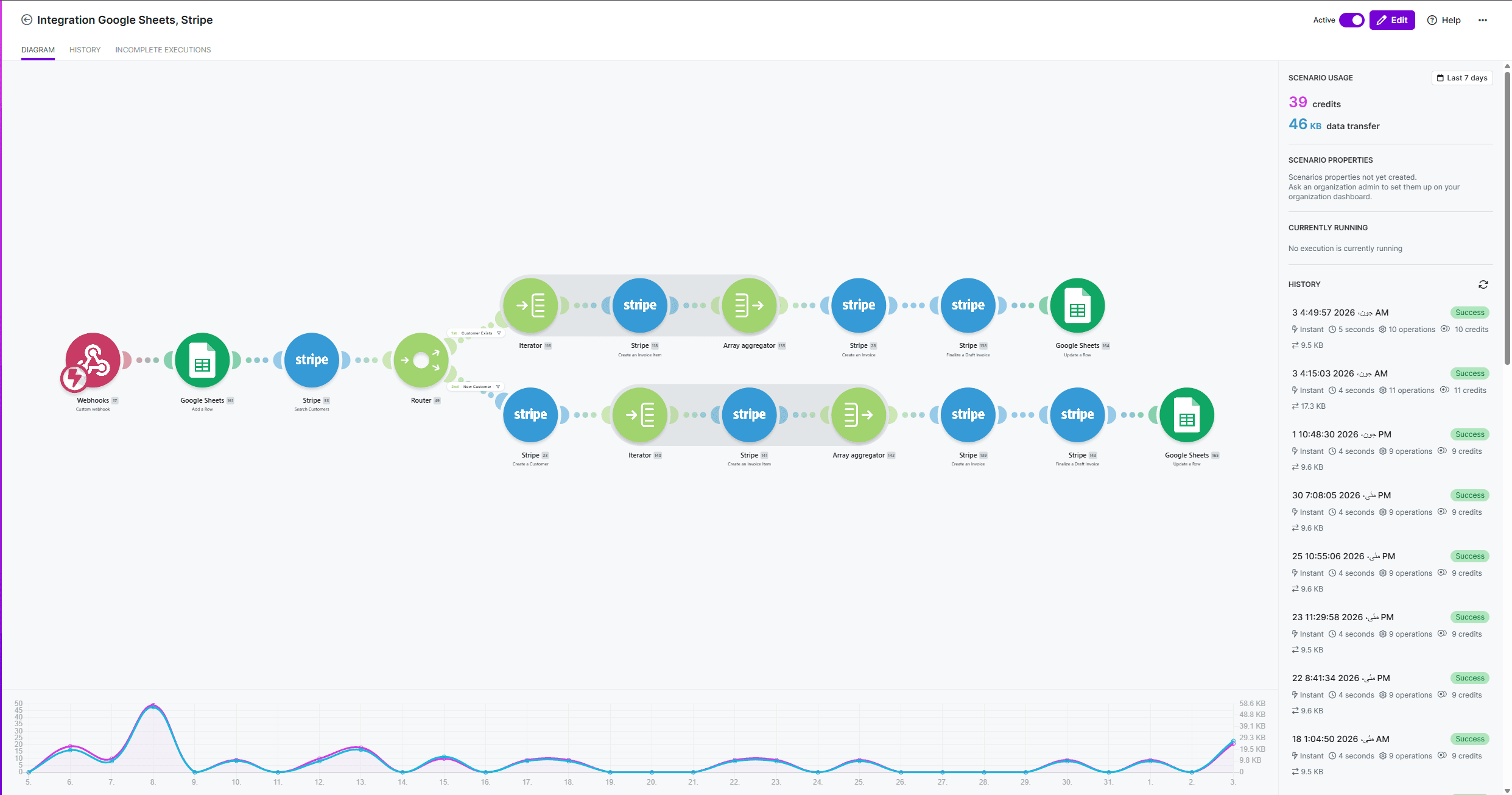
Automation Flow
Overview
Eliminating Manual Billing Entirely
Generating and sending payment links manually is a hidden time drain: look up the client, open Stripe, create a price, copy the link, compose an email, send it, then log it somewhere to avoid charging twice. For a team handling dozens of requests per week, this adds up to hours of repetitive work — and every manual step is an opportunity for error. On top of that, the owner wasn't willing to give employees direct Stripe dashboard access due to security concerns — exposing billing controls and sensitive financial data to the whole team was a non-starter. This system eliminates every manual step while keeping Stripe credentials entirely out of employees' hands.
The Problem
Manual Billing at Scale
- Access control — the owner couldn't give employees Stripe dashboard access without exposing sensitive billing data and controls
- Time waste — each payment link took several minutes to generate and send manually
- Human error — wrong amounts, wrong recipients, forgotten sends
- Duplicate charges — no central log meant the same client could be invoiced twice
- No audit trail — no automatic record of what was sent, when, and to whom
The Solution
Form → Stripe → Client in Seconds
A simple Google Form collects client name, email, amount, and description. Make.com fires instantly via webhook, calls the Stripe API to create a dynamic price object and generate an expiring payment link — Stripe then sends the payment email directly to the client. Make.com writes the link and status back into Google Sheets, blocking any future duplicate for that row.
Automation Flow
Five Steps, Zero Human Touch
The entire pipeline runs inside Make.com as a single scenario triggered by a new Google Sheets row. No server infrastructure, no code deployments — the only moving parts are the external APIs.
Key Features
Built for Reliability and Speed
Technical Highlights
Key Engineering Decisions
Stripe Price vs Product
Dynamic Prices Without Pre-Created Products
Most Stripe integrations pre-create products in the dashboard. This pipeline uses the Prices API with currency_options and an inline product definition, creating a fully dynamic price object per request. This means any amount, any description, any client — without any dashboard setup. The payment link is then created against this price, keeping the Stripe account clean without a product catalogue of one-off charges.
Idempotency via Sheets Status
Status Column as a Distributed Lock
Make.com scenarios can re-trigger on the same row if a run fails and retries. Rather than relying on Stripe idempotency keys (which require UUID generation outside Make.com's native tooling), the pipeline uses the Google Sheets Status column as a simple distributed lock: the first module in the scenario checks the cell value, and the scenario halts if it is already "Sent" — regardless of how many times the trigger fires for that row.
Technology Stack
No-Code Automation Stack
Built By
Development Team

Mujadid Sana
DeveloperNeed a billing or operations workflow automated?
We build no-code and low-code automation pipelines that eliminate repetitive manual work — from billing and invoicing to CRM updates and client communication.